How to Choose a Calculator for Study and Everyday Work
calculator is easy to overlook until the one in your hand cannot do the task in front of you. A basic desk model may be perfect for checking invoices but awkward for fractions. A scientific model may offer far more functions than an office user needs, yet still be unsuitable for a particular examination.
The best choice starts with your actual work, not the longest feature list on a box. If you are buying for school, university, a small business or home use, this guide will help you choose the right type, judge the display and keys, and check a device before paying for it.
Begin with the calculations you make
Write down the tasks you expect to perform most often. Everyday arithmetic, percentages and totals call for a different layout from algebra, statistics or trigonometry. Consider where you will use the device too: at a desk, in a classroom, on a shop counter or while travelling. A larger keypad can be comfortable for repeated entries, while a compact model is easier to carry between lessons or meetings.
If you are buying for a student, ask for the exact requirements from the school, course or examining body before choosing a model. A calculator that is useful for homework may not be permitted in an assessment, and permitted features can vary. Do not rely on a seller’s general description of a device as “exam approved”.
Confirm the current rules for the specific exam and look at the model’s functions yourself. If several people will share the device, ask them which calculations they do and whether they already know a particular keypad layout. A familiar arrangement can save time and make mistakes easier to spot.
Calculator listings can give you a view of basic, scientific and desktop styles available to compare. Use photographs to shortlist suitable layouts, then check the precise model and condition with the seller. Similar-looking versions may differ in display, power source or functions, so treat the model number and clear photos of the actual unit as more useful than a broad product title.
Choose the right category
A basic calculator handles routine arithmetic and often includes memory and percentage keys. It suits someone who wants quick answers without navigating menus. A desktop calculator generally offers a larger body, display and keys for repeated work at a fixed place. If you enter many figures during a working day, ease of reading and typing may matter more than advanced mathematical functions.
A scientific calculator adds tools for subjects such as algebra, geometry and statistics. It is usually the more practical choice for a learner whose assignments require fractions, powers, roots or trigonometric functions. Graphing models can display plots and handle more advanced work, but their added complexity is worthwhile only if a course or task calls for it. Buying a more capable device does not automatically make calculations easier if its menus slow you down.
Calculator Types Comparison: Which One Should You Choose?
The right calculator depends on the type of work you perform most often. A student preparing for mathematics classes may need different functions from someone checking accounts or handling daily business calculations.
| Calculator Type | Best For | Advantages | Limitations |
| Basic Calculator | Daily arithmetic, shopping, invoices | Simple operation, quick answers, easy keypad | Cannot handle advanced maths functions |
| Desktop Calculator | Office work and repeated calculations | Large display, comfortable keys, suitable for long use | Less portable and limited for advanced maths |
| Scientific Calculator | Students, algebra, geometry, statistics | Handles fractions, powers, roots and trigonometry | Requires learning functions and modes |
| Graphing Calculator | Advanced mathematics and technical courses | Creates graphs and supports complex calculations | More expensive and unnecessary for basic tasks |
Calculator Price Range Guide
Calculator prices vary depending on functions, brand, display quality and intended use. Typical price ranges include:
| Calculator Type | Typical Price Range | Common Users |
| Basic Calculator | $5–$20 | Home users, shops, simple calculations |
| Desktop Calculator | $10–$50 | Offices, businesses, accounting tasks |
| Scientific Calculator | $10–$60 | School, college and university students |
| Graphing Calculator | $70–$150+ | Advanced maths, engineering and technical courses |
Practical Testing Notes: What Matters in Daily Use
When comparing different calculator models, the number of functions is not always the most important factor. During practical testing, calculators with clearer displays, responsive keys and familiar layouts were easier to use for repeated calculations. A model with fewer features can often be faster when the buttons are easy to locate and the workflow matches the user’s needs. Testing common tasks such as entering long numbers, correcting mistakes and switching modes can reveal usability issues before purchase.
Check the display in real use
A clear screen reduces the chance of copying a result incorrectly. Look at the display from the angle at which you normally work, and check whether digits remain readable in the lighting you expect. Some scientific calculators show expressions in a format that resembles written mathematics, while others rely on a simpler line of characters.
Try both if possible. The most useful display is the one that helps you see what you entered and recognise a mistake before accepting the answer.
Ask how the calculator shows fractions, exponents, negative values and long expressions if these matter to your work. Can you review an earlier line, edit an entry and distinguish an input from the result? For desk work, consider whether the screen is large enough to read without lifting the device. A tilted display can be comfortable, but its angle should suit your own seating position rather than simply looking attractive in a photograph.
Feel the keys and layout
Keys that respond consistently are important when you enter figures quickly. If you can handle the calculator, type a short sequence more than once and see whether each press registers. Notice whether the most frequently used keys are easy to find without hunting across the keypad. A cramped layout may be acceptable for occasional use but tiring if you work with it for long periods.
For scientific work, inspect how secondary functions are labelled. Crowded legends can be difficult to read, especially in poor light. Check how easily you can switch modes and return to ordinary calculations.
A familiar layout may be valuable for students who follow demonstrations in class, provided the particular model meets course requirements. The aim is to reduce input errors, not to collect functions that will remain unused.
Understand power and portability
Calculators may use replaceable batteries, solar assistance or another power arrangement. Ask what powers the model you are considering and whether any battery compartment is easy to access. A solar panel can be useful in good light, but it is not a substitute for checking how the device behaves in the places where you will actually use it. For an exam or important appointment, test the calculator beforehand and follow the relevant rules about spare power.
Think about storage and travel as well. A protective cover can keep keys from being pressed in a bag and help protect the screen from scratches. A heavy desktop unit is less convenient for a student moving between classes, while a very small keypad may be frustrating on a busy counter. Choose the size that fits your routine rather than assuming smaller or larger is always better.
Verify the exact model and functions
Product names can differ by only a few characters, and packaging photos may not show the item a seller will send. Ask for the full model name from the back of the device and photographs of the front, display, cover and packaging where available. Compare those details with the function list you need. If you require a specific operation, ask the seller to demonstrate it or allow you to test it in person.
Do not assume that a list of functions guarantees an easy workflow. A feature may be hidden behind menus or work differently from the method used in your class or office. If the calculator is for a course, check whether teachers provide instructions for the exact model or a compatible layout. If it is for business use, try a realistic sequence of totals and corrections to see whether the memory and clear keys behave as you expect.
Inspect new and used units carefully
For a new calculator, confirm that the supplied item matches the listing and that the display and all keys work. Look for a clean battery compartment, intact case and readable legends. If authenticity is important to you, ask about the seller’s source, packaging and any available product documentation. Avoid treating a low-quality image or a familiar brand name in a title as proof of what will arrive.
A used calculator can still be practical if it operates reliably. Test every key, especially those you will use most, and check whether the screen has missing segments or marks that obscure digits. Open the cover if one is included, inspect hinges and look for signs of corrosion around the battery area. Ask whether the device has been reset or whether stored settings could affect results. Confirm the return conditions before buying, particularly if you cannot test it yourself.
Practise before you depend on it
Once you have a calculator, spend time learning its modes and common shortcuts. Try calculations whose answers you can check by hand, then practise correcting an entry rather than starting over. On a scientific model, learn how angle settings and display formats affect what you see. If an answer looks surprising, review the input and mode before assuming the device is faulty.
Keep the calculator clean and dry, store it with its cover and avoid pressing keys with sharp objects. Check the power source periodically if the device sits unused for long stretches. Before an exam, lesson or meeting, make sure it turns on, the screen is clear and the settings are appropriate for the task. Familiarity is often more useful than adding another feature at the last minute.
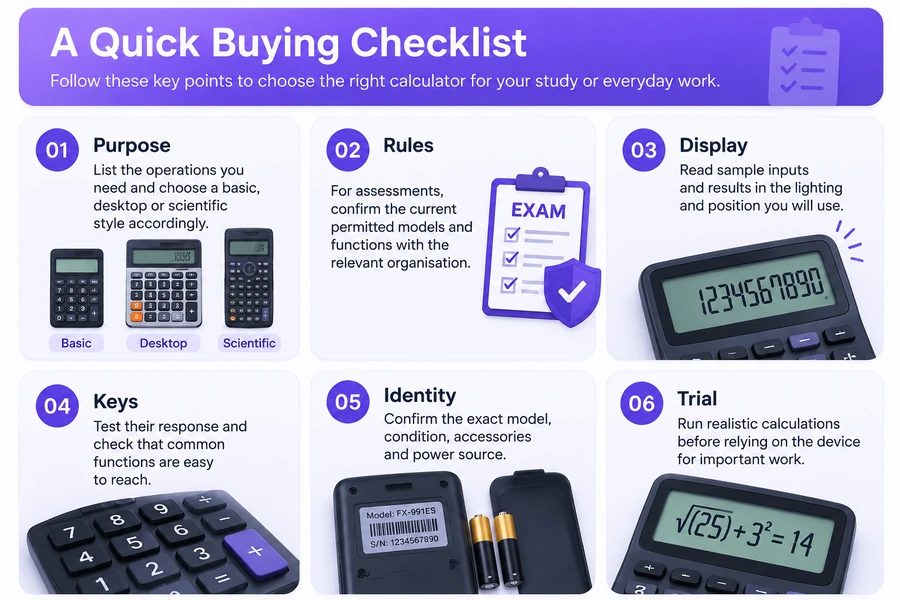
A quick buying checklist
- Purpose: List the operations you need and choose a basic, desktop or scientific style accordingly.
- Rules: For assessments, confirm the current permitted models and functions with the relevant organisation.
- Display: Read sample inputs and results in the lighting and position you will use.
- Keys: Test their response and check that common functions are easy to reach.
- Identity: Confirm the exact model, condition, accessories, and power source.
- Trial: Run realistic calculations before relying on the device for important work.
Finding the Right Calculator Model
If you want to compare different calculator models before buying, checking available listings can help you compare layouts, conditions and available options.
The bottom line
Choose a calculator around the work you actually do. A clear display, dependable keys and familiar layout can matter more than a long feature list. Check course or exam requirements where relevant, verify the exact model and test a used unit thoroughly. With the right type and a little practice, a calculator becomes a reliable everyday tool rather than another source of uncertainty.
Frequently Asked Questions
What type of calculator is best for students?
For most students, a scientific calculator is the most practical choice because it can handle algebra, fractions, powers, roots and other maths operations. However, students should always check their course or exam requirements before buying a model.
Is a scientific calculator better than a basic calculator?
A scientific calculator offers more functions, but it is not always better for every user. A basic calculator may be the better option for simple arithmetic, shopping, invoices or quick everyday calculations.
Do universities allow calculators in exams?
Calculator rules depend on the university, course and examination body. Some allow specific scientific calculators, while others restrict programmable or graphing models. Always confirm the current rules before an exam.
What features should I check before buying a calculator?
Check the calculator type, display quality, keypad comfort, required functions, battery system, size, portability and whether the exact model matches your school, work or exam requirements.
How long does a calculator battery last?
Battery life depends on the model, battery type and usage. Many calculators can operate for several years, especially models with solar assistance and low power consumption. Check the battery compartment and test the device before important use.